
Build your infrastructure.
One dashboard.
Apps, servers, backups, metrics, a file manager, terminals and a sea of other integrations.
Infrastructure as click·The infrastructure revolution is already here!
Your servers. Your control. An open-source agent.
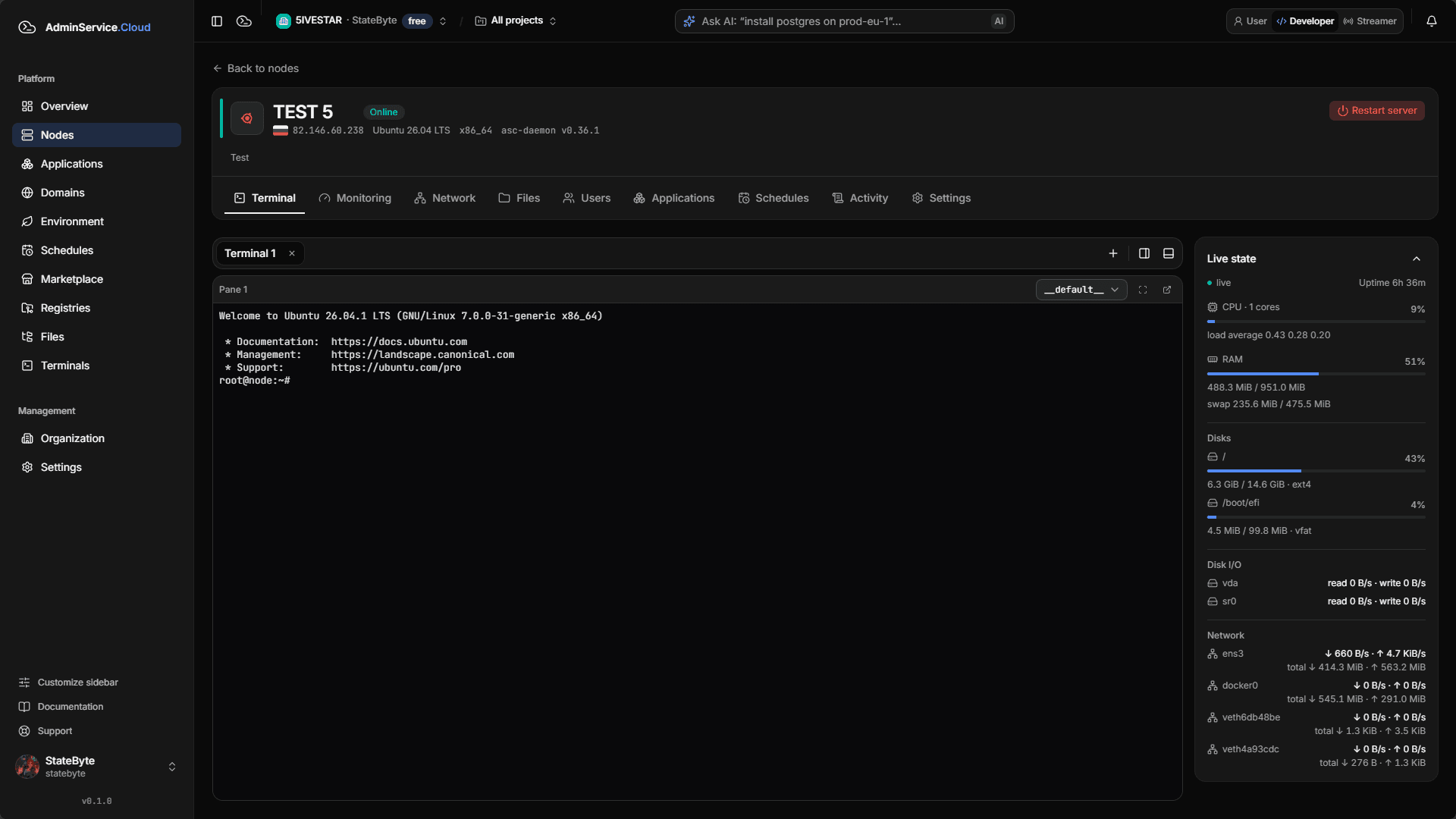
- Terminal
- Monitoring
- Applications
- Teams
Works with the technologies you already use
- Docker
- Nginx
- WireGuard
- Terraform
- Ansible
- GitHub
- GitLab
- Cloudflare
- Rust
- Timeweb Cloud
- Yandex Cloud
Everything you need to work with your infrastructure
Key features
Everything you need to work with servers
Tools that usually live across a dozen tabs and utilities, in a single panel.
Terminal in the browser
Tabs and split panes, like a familiar emulator. No SSH client or keys on every laptop.
Real-time monitoring
CPU, memory, disks and network for every node, plus a hardware inventory including graphics cards.
Catalog and install by link
Find apps in the store or paste a repository link, private ones included.
Organizations, projects and roles
Group servers into projects, invite colleagues and grant permissions per feature.
MCP server for your agents
Manage your infrastructure through your favorite AI agents: Claude Code, Codex, OpenClaw and any MCP-capable client. Install apps, read logs, diagnose issues in plain language.
Docker and native apps
Containers, compose projects, Dockerfiles and native apps managed from one place.
Server and app files
Browse and edit files right in the panel, no separate SFTP client.
Domains and SSL
Attach domains, run DNS checks and get automatic certificates for your services.
Schedules and tasks
Recurring operations on a schedule and a task log: see what ran and how it ended.
Scheduled backups
Back up apps and data on a schedule to local or cloud storage. Restore in a couple of clicks, even onto another server.
Organization transfer
Hand an entire organization over to a new owner from the panel: servers, apps, team and billing. No manual migration.
Open-source daemon
A lightweight open-source Rust daemon. It works without the platform too: CLI and package manager are yours.
150+
features that improve the usability of Linux servers and infrastructure in general
From small touches like hints and quick actions to carefully designed install and access flows. We keep adding more.
Try it on your serverInstalling apps
Two convenient ways to install an app
Find what you need in the catalog or paste a repository link. The platform figures out what is inside.
By search
Open the app store and find what you need by name or category: databases, sites, bots, game servers, neural networks.
- A catalog with categories and descriptions
- Your own package registries next to the public catalog
- Pick a server, answer the setup questions, done
By link
Paste a repository link: the platform clones it, detects the install methods and shows what is inside before launch.
- asc.yaml and ASC app stacks
- docker compose: the project runs as a single app
- Dockerfile: the app is built on your server, ports and volumes are detected automatically
Private repositories
Private code is not a problem either
If a repository is closed, the platform does not throw a vague error. It offers to add credentials right in the install dialog.
- HTTPS with an access token
- SSH with a deploy key, including your organization's SSH key
- Credentials are stored securely and tied to the organization, so you never retype them
- Private apps are visible only to your organization
Integrations
Works with the services you already use
Connect clouds, DNS and Git hosts once, and the platform works with them for you.
Clouds and DNS
Timeweb Cloud
Creates a VPS from the “Add server” wizard, installs the daemon and connects the machine as a node.
Yandex Cloud
Spins up a Compute Cloud virtual machine and connects it to the platform.
Cloudflare
Updates DNS records of your domains and issues Origin CA certificates.
Terraform / OpenTofu
Your own templates for networks, disks and DNS: a plan before applying and provider accounts kept separate.
Git hosts
GitHub
Install apps from a repository link, private ones included.
GitLab
Repositories and the image registry, private ones by token.
Sourcecraft
Install from git.sourcecraft.dev repositories by token or SSH key.
How it works
Connect once, use everywhere
- 1
Connect
In “Organization → Integrations” paste an API token or key. The platform verifies it with a request to the provider.
- 2
Storage
The secret is stored encrypted and never returned to the browser: only a “set” flag is exposed.
- 3
Use
Creating a cloud server, updating DNS or installing from a private repository takes a couple of clicks, with no manual key entry.
- 4
Stay in control
Viewing and changing integrations are separate permissions. Disconnect, and the platform loses access to the provider.
We recommend a dedicated key with minimal permissions. Each integration page has a guide to the rights it needs.
Security
Your servers, locked down. Always.
Security isn't an option or a pricing tier — it's the foundation of the platform. We protect sign-in, data, traffic and the servers themselves, and make sure you can go back if something goes wrong.
Two-factor, your way
Sign in however suits you, and add a second factor that can't be brute-forced.
- Passkeys: sign in with fingerprint or Face ID, no password
- TOTP codes in any authenticator app
- One-time codes via Telegram and email
- Recovery codes in case you lose your device
Always in the loop
Every important account event is a notification, not a surprise.
- Sign-ins from new devices and suspicious attempts
- Changes to passwords, passkeys and protection methods
- Delivered to Telegram or email — your choice
We encrypt what must stay hidden
Secrets never sit in plain text — not in the database, not in backups.
- Tokens, keys and passwords stored with AES-256-GCM
- Passwords are Argon2id hashes only — they can't be recovered
- Critical actions require re-confirmation
SSL without a single click
Attach a domain and it's already served over HTTPS.
- Let's Encrypt certificates are issued automatically
- Renewed ahead of time, no effort on your side
- We warn you if anything is wrong with a certificate
Backups that save the day
Your app data stays safe even when a server is unreachable.
- Manual or scheduled — say, every night
- Stored on the server and in your own S3 storage
- One-click restore
Rolling back is normal
An update went wrong? Get back to a working state in seconds.
- Return an app to its previous state
- Automatic revert when an update fails
- A backup before risky operations
Constant updates
The platform and the daemon on your servers improve every day.
- Regular fixes and security hardening
- The daemon is open source — verify it yourself
- Updates without stopping your apps
Server firewall under control
Close everything you don't need right from the panel — no SSH, no manual rules.
- Configure nftables rules through the UI
- Brute-force protection with fail2ban
- Unneeded ports closed — open only what you need
From server to workspace
Three steps. And you’re connected.
Start with one machine. Add the rest when you need them.
- 01
Install the agent
Run the command on your server. The open-source asc-daemon connects your machine to the platform.
- 02
Connect your server
Sign in, create an organization, and add your server to your workspace.
- 03
Work from your browser
Open a terminal, check your metrics, and start managing your applications.
$ curl -fsSL https://get.adminservice.cloud | shUse cases
What the platform does for you
Pick your role and see how AdminService.Cloud handles the tasks you run into.
Developer
You write code, not nginx and systemd configs. The platform handles the routine between “works locally” and “works on the server”.
How the platform helps
- Deploy from a GitHub repository using an asc.yaml manifest: the environment lives in code and reproduces with one command.
- Terminal, logs and server files in the browser: peek into production without an SSH client or keys on every laptop.
- Your own package registries and publishing to the marketplace, free of charge.
- Environment variables and secrets are stored apart from the code.
In real life
A side project on a VPS: connect the server, describe the app in asc.yaml, roll it out from the repo. Config tweaks go through the built-in file manager instead of scp.
Your next server is one step closer.
Bring your infrastructure into one workspace. Start by connecting your first server.
Connect a serverYour servers. Your control. An open-source agent.